The Definitive Guide to Fonts & Font Sizes in Academic Paper Figures
>Ever had your paper bounced back because "figure does not meet formatting requirements"? Or your advisor telling you "the font is wrong and the labels are too small"?
Fonts and sizes seem trivial, but they're one of the most overlooked — and most error-prone — parts of academic publishing. This guide covers the formatting rules for both Chinese and English social science journals, and gives you copy-paste-ready Matplotlib configs.
Why Fonts & Sizes Matter
Your figures will end up in a journal PDF, in print, or on a phone screen. The goal is simple: stay readable at the final rendered size.
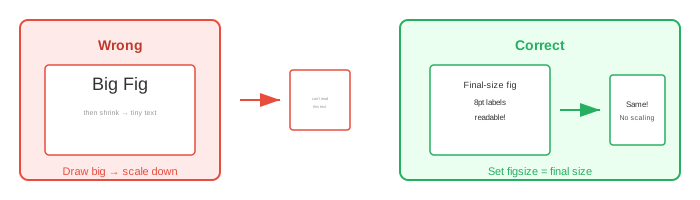
Journals shrink your figures to fit single- or double-column widths. If your labels start at 8pt and the figure gets scaled down 50%, you end up with 4pt text — nearly invisible. Too large, and you waste space.
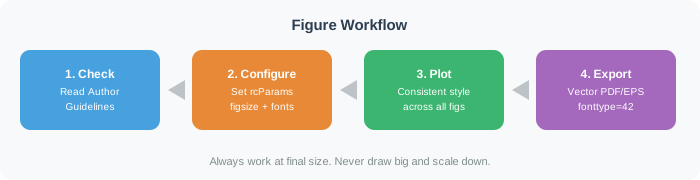
The right approach: set figsize in Matplotlib to the journal's final dimensions, then choose font sizes that work at that size. Don't draw a huge figure and shrink it later.
Chinese Social Science Papers — Font & Size Standards
National Standards & Common Conventions
Chinese academic paper formatting follows GB/T 7713.2—2022 (Rules for Academic Paper Writing), plus university thesis templates and journal submission guides. While the national standard is loose on figure internals, a strong consensus has formed.
Standard Text Elements in Figures
| Element | Font | Size | Notes |
|---|---|---|---|
| Figure caption (below figure) | Song / Hei | 9–10.5 pt | Centered; "Figure 1" in bold |
| Axis labels | Song | 7.5–9 pt | Variables in italic, units in roman |
| Tick labels (numbers) | Times New Roman | 7.5–9 pt | Always use a Western font for numbers |
| Legend text | Song + Times New Roman | 7.5–9 pt | Mixed CJK + Latin |
| Figure notes (source, annotation) | Song | 9 pt | Below the figure |
Key rule: Chinese text in Song (宋体) or Hei (黑体) for bold headings; English and numbers in Times New Roman. This is the universal font pairing in Chinese academic publishing.
Major Chinese Journal Requirements
CSSCI journals (general):
- Notes, source lines: Song or Times New Roman, 9 pt
- Figure number + caption: centered below figure, 12 pt Song
- In-figure text (axes, labels): Song, 7.5 pt
- Table text: 9–10 pt, as long as it's legible
- Use concise Chinese labels for variables — avoid raw English variable codes
- Format regression output cleanly; never paste raw software output
- Figure notes: Song, 9 pt, 1.25× line spacing, centered
- Figure captions go below the figure; table captions go above the table
Chinese Size Names → Points Conversion
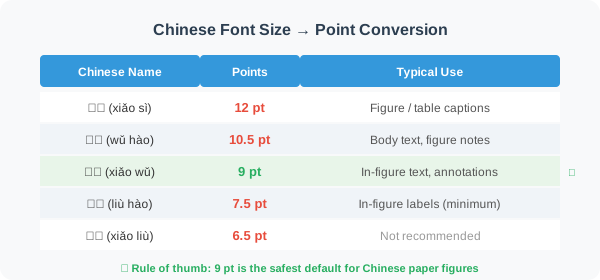
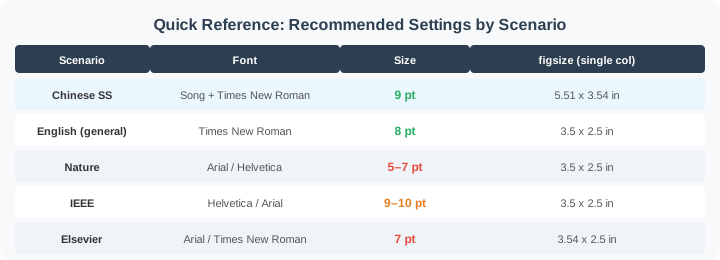
Rule of thumb: For Chinese paper figures, 9 pt (小五) is the safest choice. When in doubt, use 9 pt — it won't waste space, and it stays readable after scaling.
English Social Science Papers — Font & Size Standards
APA Style (Most Common in Social Sciences)
APA 7th Edition requirements for figures:
Major English Journal Requirements
Nature / Nature Human Behaviour
| Element | Requirement |
|---|---|
| Font | Arial or Helvetica (sans-serif, mandatory) |
| Text size | 5–7 pt |
| Subplot labels (a, b, c) | 8 pt bold, lowercase roman |
| Minimum size | 5 pt |
| Single-column width | 89 mm (3.5 in) |
| Double-column width | 183 mm (7.2 in) |
| Max height | 247 mm (9.7 in) |
| Resolution | Min 300 dpi, recommended 450 dpi+ |
| File format | PDF or EPS (vector) |
IEEE (Engineering & Interdisciplinary)
| Element | Requirement |
|---|---|
| Font | Helvetica / Times New Roman / Arial / Cambria |
| Recommended size | 9–10 pt (minimum 6 pt) |
| Axis labels | 8–10 pt |
| Subplot labels | 8 pt Times New Roman, format: (a) (b) (c) |
| Single-column width | 3.5 in (88.9 mm) |
| Double-column width | 7.16 in (182 mm) |
| Line width | Min 0.5–1.0 pt |
| Resolution | Line art >600 dpi; grayscale/color >300 dpi |
Elsevier Journals (Many SSCI Social Science Titles)
| Element | Requirement |
|---|---|
| Font | Arial / Helvetica / Times New Roman / Courier |
| Text size | 7 pt (at final print size) |
| Sub/superscript | Min 6 pt |
| Single-column width | 90 mm |
| 1.5-column width | 140 mm |
| Double-column width | 190 mm |
| Resolution | Line art 1000 dpi; mixed 500 dpi; photos 300 dpi |
Springer Nature Social Science Journals
| Element | Requirement |
|---|---|
| Font | Helvetica or Arial (sans-serif) |
| Size range | 8–12 pt (2–3 mm) |
| Resolution | Line art 1200 dpi; grayscale 300 dpi |
American Economic Review (AER)
| Element | Requirement |
|---|---|
| Body font | Times New Roman |
| Figure format | Vector PDF / EPS / AI |
| Photo resolution | 300 dpi |
| Special rule | No asterisks for significance — use standard errors in parentheses |
Common Patterns Across English Journals
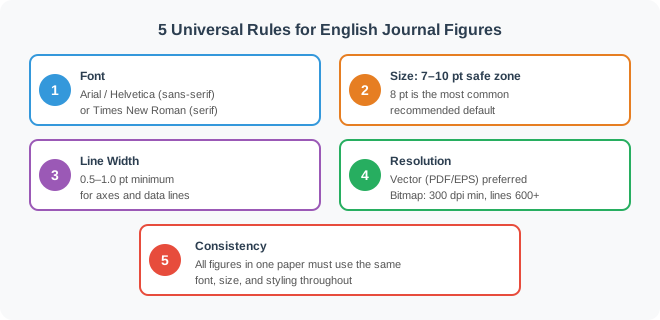
Rule of thumb: For English papers, 8 pt + Arial or Times New Roman is the safest default. When in doubt, check your target journal's Author Guidelines.
Complete Matplotlib Configurations
Chinese Paper Config (Song + Times New Roman)
The core requirement:
Chinese in Song (宋体), English and numbers in Times New Roman.Option A: Global rcParams (Recommended)
import matplotlib.pyplot as plt
from matplotlib import rcParams

config = {
    "font.family": "serif",
    "font.serif": ["SimSun"],        # Song Ti (Windows) / "Songti SC" (macOS)
    "font.size": 9,                   # Global default = 9 pt
    "mathtext.fontset": "stix",       # Math font close to Times New Roman
    "axes.unicode_minus": False,      # Fix minus sign rendering
    "axes.labelsize": 9,              # Axis labels
    "axes.titlesize": 10.5,           # Figure title = 10.5 pt
    "xtick.labelsize": 9,
    "ytick.labelsize": 9,
    "legend.fontsize": 9,
    "figure.dpi": 300,
    "savefig.dpi": 600,
    "figure.figsize": (5.51, 3.54),   # Double-column width 140mm
}
rcParams.update(config)import numpy as np
x = np.linspace(0, 10, 100)
y1, y2 = np.sin(x), np.cos(x)
fig, ax = plt.subplots(figsize=(5.51, 3.54))
ax.plot(x, y1, label="Sine", linewidth=1.0)
ax.plot(x, y2, label="Cosine", linewidth=1.0, linestyle="--")
ax.set_xlabel("Time (s)")
ax.set_ylabel("Amplitude (V)")
ax.set_title("Trigonometric Comparison")
ax.legend()
# Force tick labels to Times New Roman
for label in ax.get_xticklabels() + ax.get_yticklabels():
label.set_fontname("Times New Roman")
plt.tight_layout()
plt.savefig("figure_cn.pdf", bbox_inches="tight")
plt.show()Option B: The mksci-font Library (Simplest)
from mksci_font import config_font, mksci_font

# Global config
config_font({"font.size": 9})

# Or use decorator
class="syn-decorator">@mksci_font(ylabel="Y-Axis Label")
def my_plot():
    _, ax = plt.subplots(figsize=(5.51, 3.54))
    ax.plot([1, 2, 3], [4, 5, 6])
    return ax

my_plot()
Option C: Matplotlib 3.6+ Font Fallback
Matplotlib 3.6 introduced font fallback — list multiple fonts and it picks the right one per character:
import matplotlib.pyplot as plt

plt.rcParams["font.family"] = ["Times New Roman", "SimSun"]
plt.rcParams["axes.unicode_minus"] = False
English/numbers render in Times New Roman; Chinese characters automatically fall back to Song. This is the simplest approach today.
English Paper Configs
General Academic (Serif / Times New Roman)
import matplotlib.pyplot as plt

plt.rcParams.update({
    "font.family": "serif",
    "font.serif": ["Times New Roman"],
    "font.size": 8,                   # 8 pt — the universal safe choice
    "axes.labelsize": 8,
    "axes.titlesize": 9,
    "xtick.labelsize": 8,
    "ytick.labelsize": 8,
    "legend.fontsize": 7,
    "xtick.direction": "in",          # Ticks point inward
    "ytick.direction": "in",
    "xtick.minor.visible": True,
    "ytick.minor.visible": True,
    "axes.linewidth": 0.5,
    "lines.linewidth": 1.0,
    "figure.dpi": 150,
    "savefig.dpi": 600,
    "savefig.bbox": "tight",
    "pdf.fonttype": 42,               # Embed as TrueType (best compatibility)
    "ps.fonttype": 42,
})
Nature Style (Sans-Serif / Arial)
import matplotlib.pyplot as plt

plt.rcParams.update({
    "font.family": "sans-serif",
    "font.sans-serif": ["Arial", "Helvetica", "DejaVu Sans"],
    "font.size": 7,                   # Nature standard: 5–7 pt
    "axes.labelsize": 7,
    "axes.titlesize": 7,
    "xtick.labelsize": 6,
    "ytick.labelsize": 6,
    "legend.fontsize": 6,
    "axes.linewidth": 0.5,
    "lines.linewidth": 0.75,
    "xtick.major.width": 0.5,
    "ytick.major.width": 0.5,
    "xtick.major.size": 3,
    "ytick.major.size": 3,
    "figure.dpi": 150,
    "savefig.dpi": 450,               # Nature recommends 450 dpi+
    "pdf.fonttype": 42,
    "ps.fonttype": 42,
})

# Nature single-column figure
fig, ax = plt.subplots(figsize=(3.5, 2.5))  # 89 mm ≈ 3.5 in
IEEE Style
import matplotlib.pyplot as plt

plt.rcParams.update({
    "font.family": "sans-serif",
    "font.sans-serif": ["Helvetica", "Arial"],
    "font.size": 9,                   # IEEE recommends 9–10 pt
    "axes.labelsize": 9,
    "axes.titlesize": 10,
    "xtick.labelsize": 8,
    "ytick.labelsize": 8,
    "legend.fontsize": 8,
    "axes.linewidth": 0.5,
    "lines.linewidth": 1.0,
    "figure.dpi": 150,
    "savefig.dpi": 600,
    "pdf.fonttype": 42,
})

# IEEE single-column
fig, ax = plt.subplots(figsize=(3.5, 2.5))   # 88.9 mm ≈ 3.5 in
# IEEE double-column
fig, ax = plt.subplots(figsize=(7.16, 4.0))  # 182 mm ≈ 7.16 in
SciencePlots Library (One-Line Journal Styles)
import matplotlib.pyplot as plt
import scienceplots

# General science style
plt.style.use("science")

# IEEE style
plt.style.use(["science", "ieee"])

# Nature style
plt.style.use(["science", "nature"])

# Chinese support
plt.style.use(["science", "no-latex", "cjk-sc-font"])

# Custom overlay
plt.style.use("science")
plt.rcParams.update({
    "font.family": "serif",
    "font.serif": ["Times New Roman"],
    "font.size": 8,
})
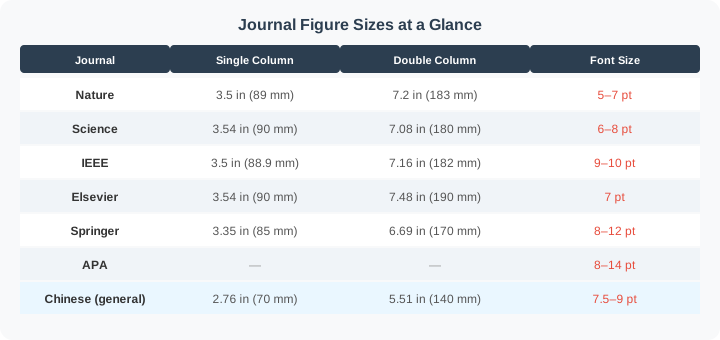
Quick Reference: figsize by Journal
Best Practices Checklist
Before Plotting
- Read your target journal's Author Guidelines / Figure Guidelines
- Set
figsizeto the journal's final dimensions (don't scale after the fact) - Pick the right font family (serif vs. sans-serif, per journal rules)
- Set global font sizes via
rcParams
While Plotting
- Axis labels include variable name and unit:
Variable (unit)orVariable / unit - Variables in italic, units in roman
- All figures in the same paper use consistent font, size, and line width
- Place legend inside the figure or below it — never on the side
- Use colorblind-friendly palettes (viridis, Paul Tol, etc.)
When Saving
- Prefer vector formats (PDF / EPS)
- For bitmaps: min 300 dpi (line art: 600 dpi+)
- Use
bbox_inches="tight"to avoid clipping - Set
pdf.fonttype: 42andps.fonttype: 42to embed fonts as TrueType
Quality Check
- Verify text is readable at 100% zoom (no smaller than 5–6 pt)
- Confirm fonts are properly embedded in the exported file
- Test grayscale printing — make sure meaning doesn't depend solely on color
Complete Example: Coefficient Plot for an Empirical Paper
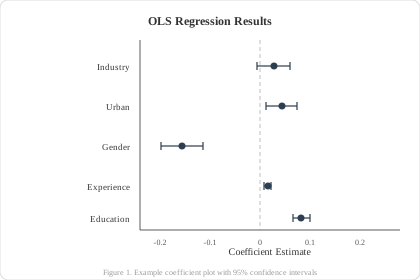
A ready-to-use Matplotlib example for social science regression results:
import matplotlib.pyplot as plt
import numpy as np

# ========== Global Config ==========
plt.rcParams.update({
    "font.family": "serif",
    "font.serif": ["Times New Roman"],
    "font.size": 8,
    "axes.labelsize": 9,
    "axes.titlesize": 10,
    "xtick.labelsize": 8,
    "ytick.labelsize": 8,
    "legend.fontsize": 7,
    "xtick.direction": "in",
    "ytick.direction": "in",
    "axes.linewidth": 0.5,
    "lines.linewidth": 1.0,
    "figure.dpi": 150,
    "savefig.dpi": 600,
    "pdf.fonttype": 42,
    "ps.fonttype": 42,
})

# ========== Data ==========
variables = ["Education", "Experience", "Gender", "Urban", "Industry"]
coefficients = [0.082, 0.015, -0.156, 0.043, 0.027]
ci_lower = [0.065, 0.008, -0.198, 0.012, -0.005]
ci_upper = [0.099, 0.022, -0.114, 0.074, 0.059]

errors = [[c - l for c, l in zip(coefficients, ci_lower)],
          [u - c for u, c in zip(ci_upper, coefficients)]]

# ========== Plot ==========
fig, ax = plt.subplots(figsize=(3.5, 2.8))  # Single-column width

y_pos = np.arange(len(variables))
ax.errorbar(coefficients, y_pos, xerr=errors, fmt="o",
            color="#2c3e50", markersize=4, capsize=3,
            capthick=0.8, elinewidth=0.8)

ax.axvline(x=0, color="gray", linestyle="--", linewidth=0.5)
ax.set_yticks(y_pos)
ax.set_yticklabels(variables)
ax.set_xlabel("Coefficient Estimate")
ax.set_title("OLS Regression Results")

# Remove top and right spines
ax.spines["top"].set_visible(False)
ax.spines["right"].set_visible(False)

plt.tight_layout()
plt.savefig("regression_coefplot.pdf", bbox_inches="tight")
plt.show()
This coefficient plot is increasingly popular in economics and sociology. Reviewers now often prefer graphical coefficient displays over regression tables alone.
FAQ
Q: What font should numbers use in Chinese paper figures? A: Numbers and English text should always use Times New Roman. This is the standard convention in Chinese academic publishing. Q: Should I think in "pt" or in Chinese size names? A: In Matplotlib, always use pt (points). Key conversions: 五号 = 10.5 pt, 小五 = 9 pt, 六号 = 7.5 pt. Q: Nature and AER have very different font requirements — what do I do? A: Nature mandates sans-serif (Arial/Helvetica); economics journals typically use serif (Times New Roman). Always follow the target journal's Author Guidelines. Q: My Matplotlib figures keep using the wrong font. Help? A:- Confirm the font is installed on your system (e.g., SimSun, Arial)
- Clear Matplotlib's font cache:
rm -rf ~/.cache/matplotlib/* - Restart Python and re-import matplotlib
- On Linux, you may need to manually copy font files into Matplotlib's
ttfdirectory
plt.rcParams["pdf.fonttype"] = 42 and plt.rcParams["ps.fonttype"] = 42 to embed fonts as TrueType.
Summary
Fonts and sizes aren't minor details — they're the
first impression** your paper makes on reviewers. Get them right and you'll avoid revision requests, while making your visualizations look clean, professional, and credible.